Google Business Profile Optimization: A Step-by-Step Guide
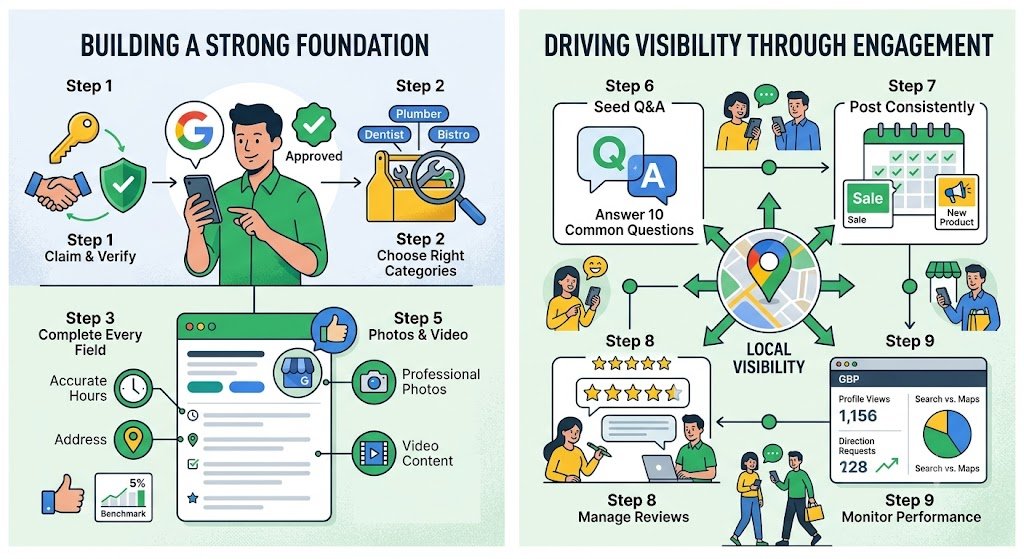
Google Business Profile (GBP) is one of the few genuinely free, high-impact marketing assets available to a local business — but “free” doesn’t mean “effortless.” An unclaimed, incomplete, or poorly maintained profile actively degrades your local ranking signal, while a fully optimized one can meaningfully outperform paid advertising for local visibility. Here’s a step-by-step approach to getting it right.
Step 1: Claim and Verify Your Profile
If you haven’t already, claim your listing through Google Business Profile Manager and complete identity verification. Video verification, which involves recording a continuous walkthrough showing exterior signage, the interior, and a live management action, has become the default verification method for new listings in most regions — plan for this rather than expecting the legacy postcard-mail verification workflow.
Step 2: Choose the Right Categories
Category selection is arguably the single highest-leverage taxonomy edit available on the entire profile. Choose the most specific, accurate primary category available rather than a broad, generic one — a narrower category that precisely matches your core service tends to produce meaningfully better visibility for relevant query matches than a vague catch-all classification. Add secondary categories for legitimate additional service lines, but avoid stuffing in loosely related categories purely for incremental visibility, which can dilute the relevance signal Google’s local algorithm assigns to your entity.
Practical audit tip: Query your top target keywords in an incognito Maps session, inspect the primary category of the top three ranking competitors, and benchmark against your own selection.
Step 3: Complete Every Profile Field
- Accurate, consistent business name (matching your signage and website exactly — no keyword stuffing in the name field, which violates Google’s Business Profile guidelines and risks suspension).
- Complete address, service-area radius (for service-area businesses/SABs), and phone number.
- Accurate business hours, including special hours for holidays and closures.
- A clear, genuinely descriptive business summary.
- Website link and appointment/booking integration links where applicable.
- Relevant attributes (accessibility features, payment options, amenities) populated in full.
Step 4: Build Out Products and Services
The Products and Services section has become increasingly consequential, particularly for product-based businesses, since it can sync with Google Shopping’s merchant feed and directly influence visibility for product-specific queries. List services and products with clear names, descriptions, and pricing metadata where relevant.
Step 5: Use Photos and Video Strategically
Profiles with professional, current photo assets consistently outperform those with sparse or stale imagery on click-through behavior. Include:
- A high-resolution logo and cover photo matching your brand identity.
- Storefront and interior photos so prospective customers know what to expect.
- Team photos to build trust and familiarity (an experience/E-E-A-T-adjacent signal).
- Photos or short video of products/services in operation.
Video content, generally supported up to around 60 seconds, can meaningfully boost engagement when uploaded at sufficient resolution and kept concise.
Step 6: Seed and Maintain the Q&A Section
The Q&A section is a public, crowd-sourced feature that can be answered by anyone, including individuals with no connection to your business — leaving it unseeded or unmonitored is a missed opportunity and a reputational risk. Proactively seed it with the ten most common questions customers actually ask, answered clearly and helpfully, and monitor it regularly to correct any inaccurate crowd-submitted answers.
Step 7: Post Consistently
Google Posts function primarily as an engagement and freshness signal rather than a direct Local Pack ranking lever — but consistent posting (weekly is a reasonable cadence) helps demonstrate that a business entity is active and attentive, occupies profile real estate that a competitor’s content might otherwise fill, and reinforces the overall trust signal. Treat posts as a conversion and engagement tool rather than a ranking-manipulation shortcut.
Step 8: Manage Reviews Actively
- Solicit reviews from satisfied customers consistently, rather than relying on organic accrual alone.
- Respond to every review, positive and negative, in a genuine and timely way — response behavior is itself an engagement signal.
- Never purchase or incentivize reviews in ways that violate platform policy — the risk of profile suspension isn’t worth the short-term prominence gain.
Step 9: Monitor Performance and Adjust
Regularly review the Performance/Insights dashboard of your profile — track impression volume, the split between Search and Maps discovery surfaces, and action rates (calls, direction requests, website click-throughs). A reasonable benchmark to target is at least a 5% combined action rate across all tracked interaction types; if you’re consistently underperforming that threshold, audit your photo assets, business description, and category accuracy before attributing the shortfall purely to competitive density.
Frequently Asked Questions
How often should I update my Google Business Profile?
Treat it as an ongoing, living entity record rather than a set-and-forget listing — weekly posts, prompt review responses, and periodic photo-asset refreshes keep the profile active and accurate in Google’s evaluation.
Can changing my primary category hurt my rankings?
It’s possible if the new category is less accurate than the original, so changes should be grounded in genuine relevance to your core service line, not guesswork. Test carefully and monitor performance metrics after any category change.
What should I do if Google auto-generates incorrect information on my listing?
Google’s systems sometimes algorithmically add or adjust service descriptions and attributes automatically. Review your profile periodically for these auto-generated changes and correct any inaccuracies promptly.
Final Thoughts
A fully optimized Google Business Profile is less about any single tactical trick and more about consistent, accurate completeness across every available field, paired with ongoing operational activity. Businesses that treat it as a living entity record — reviewed, updated, and engaged with regularly — consistently outperform those that configure it once and never return.
References
- Google Business Profile Help — Google Business Profile Help Center
- Google Business Profile Help — Guidelines for representing your business on Google
Want a hands-on Google Business Profile optimization for your listing? Contact us today.